Deploy Codex Pooler on Railway
No server to manage: the Railway template creates Codex Pooler and its persistent PostgreSQL database in your account. Secrets, the public HTTPS domain, and database migrations are configured for you.

Deploy the template
Section titled “Deploy the template”- Open the template above and sign in to Railway. Choose the workspace where you want to run the instance.
- Review the two included services: Codex Pooler and Postgres. Keep the generated variables and database volume; you do not need to create secrets or paste migration commands.
- Click Deploy. Railway starts PostgreSQL, runs the application’s migrations and pricing import, then checks readiness before exposing the app.
- Wait for the application deployment to become active. Open Codex Pooler → Settings → Networking and follow its generated public domain.
You need enough available Railway credit or an active paid plan. Codex Pooler is free to self-host; Railway bills the application, database, storage, and network usage. Review Railway pricing and set usage limits. Trial credit is for evaluation, not indefinite free hosting.
Create the first owner
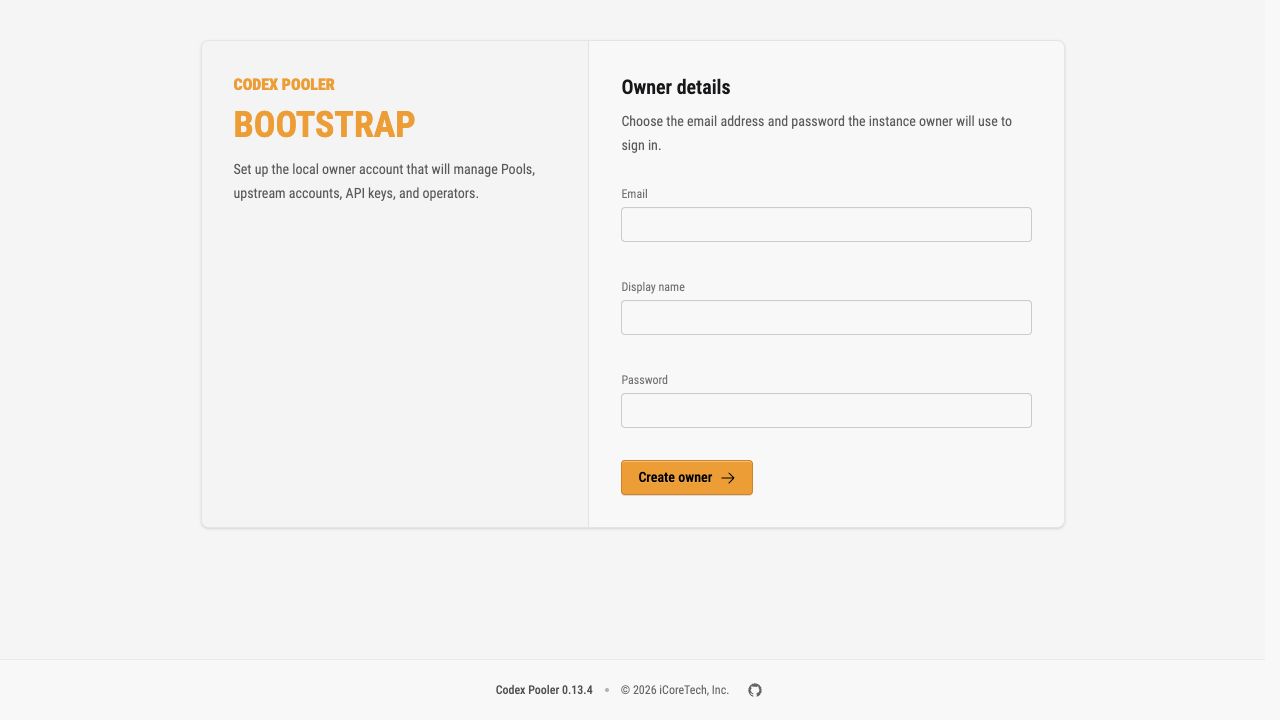
Section titled “Create the first owner”The new instance opens at /bootstrap. Create your owner account immediately, before sharing the domain: the first account controls the instance. Store the password securely, then sign in.
Connect your first client
Section titled “Connect your first client”- Open Pools and create a Pool.
- Open Upstreams, connect a Codex account you are authorized to use, and assign it to the Pool.
- Open API keys, create a Pool API key, and copy it once into your secure credential storage.
- Follow your client’s setup guide, using the Railway domain as the instance address. Codex backend clients use
/backend-api/codex; selected OpenAI-compatible SDK clients use the narrow/v1surface.
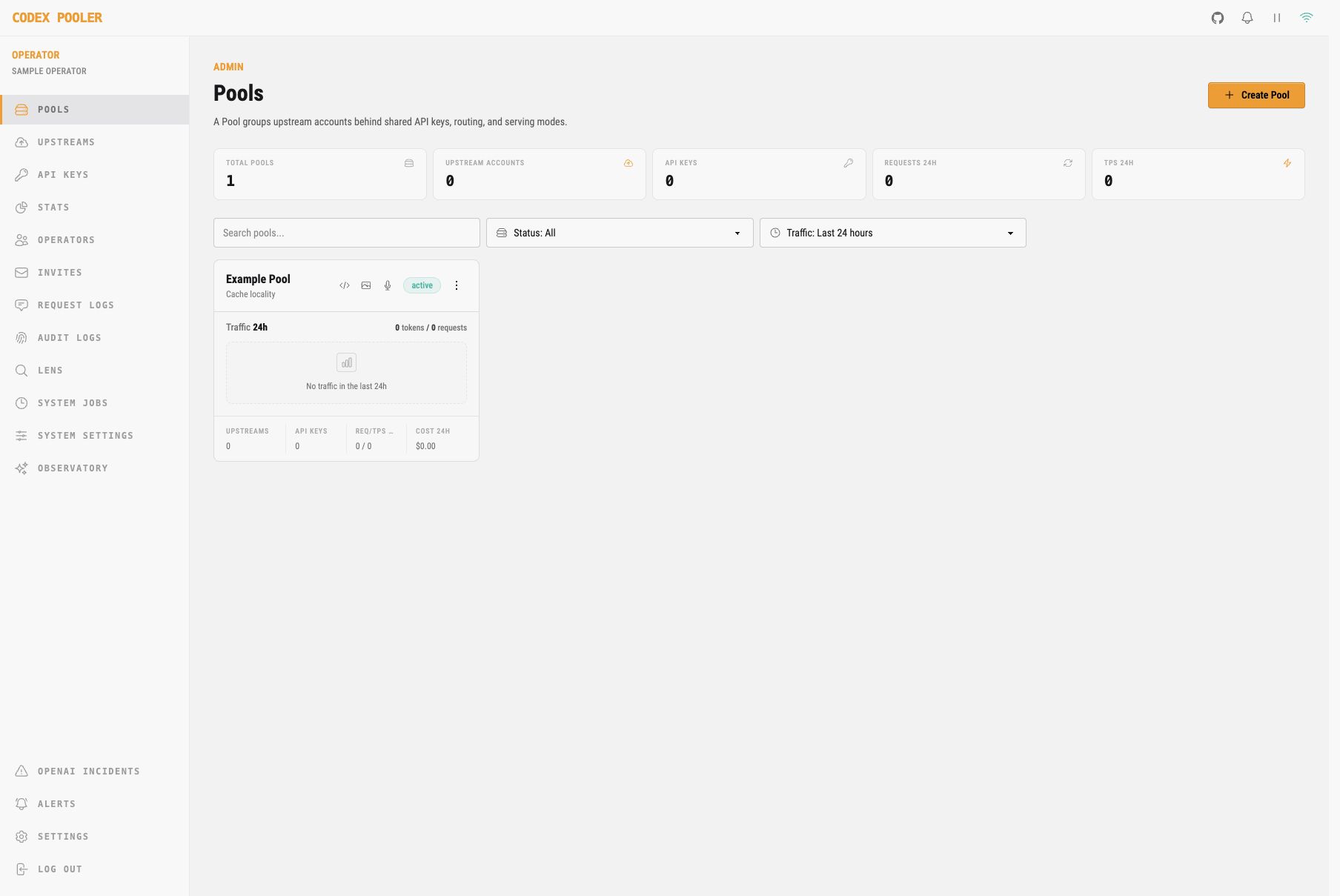
The quick start shows the Pool, upstream, and key setup screens. For other tools, see OpenAI-compatible clients.
What the template configures
Section titled “What the template configures”| Component | Preset |
|---|---|
| Application | ghcr.io/icoretech/codex-pooler:latest, following stable releases; one replica; no application volume |
| Database | postgres:18-alpine, with a persistent volume at /var/lib/postgresql |
| Database connection | Private network between the two services |
| HTTPS | Generated Railway domain pointing to application port 4000 |
| Secrets | Independently generated database password, session secret, TOTP key, and upstream encryption key |
| Background work | OBAN_MODE=all: web, worker, and scheduler in one always-running service |
| Startup | Migrations and bundled pricing import before the application starts |
| Readiness and shutdown | /readyz deployment healthcheck and 135 seconds for shutdown |
Keep the services in the same region. No Redis service is needed. The readiness healthcheck gates each deployment; use monitoring for continuous health checks.
Advanced configuration reference
These values are supplied by the template. Use this reference when inspecting the deployment or deliberately changing its configuration.
Application variables
Section titled “Application variables”| Variable | Value |
|---|---|
DATABASE_URL |
postgresql://${{Postgres.POSTGRES_USER}}:${{Postgres.POSTGRES_PASSWORD}}@${{Postgres.RAILWAY_PRIVATE_DOMAIN}}:5432/${{Postgres.POSTGRES_DB}} |
PHX_SERVER |
true |
PORT |
4000 |
PHX_HOST |
${{RAILWAY_PUBLIC_DOMAIN}} |
OBAN_MODE |
all |
POOL_SIZE |
10 |
SECRET_KEY_BASE |
${{secret(64)}} in the template composer |
CODEX_POOLER_TOTP_ENCRYPTION_KEY |
${{secret(32)}} in the template composer |
CODEX_POOLER_TOTP_KEY_VERSION |
v1 |
CODEX_POOLER_UPSTREAM_SECRET_KEY |
A separate ${{secret(32)}} in the template composer |
CODEX_POOLER_UPSTREAM_SECRET_KEY_VERSION |
v1 |
RAILWAY_DEPLOYMENT_DRAINING_SECONDS |
135 |
Reference variables use Railway’s variable syntax. Postgres names the database service; update the references if you rename it. Use the private hostname, not a public TCP proxy URL.
The secret(...) expressions generate values when deploying a template. Do not paste those expressions into a manually created service’s live variables. Supply independently generated values instead: at least 64 bytes for SECRET_KEY_BASE, and exactly 32 raw bytes for each encryption key. A 32-character ASCII value supplies 32 raw bytes; base64 encoding of exactly 32 bytes is also accepted.
Database variables and storage
Section titled “Database variables and storage”| Variable | Value |
|---|---|
POSTGRES_USER |
codex_pooler |
POSTGRES_DB |
codex_pooler |
POSTGRES_PASSWORD |
${{secret(32)}} in the template composer |
PostgreSQL 18 mounts its persistent volume at /var/lib/postgresql. Do not substitute the older /var/lib/postgresql/data mount or attach a volume to the app. Keep the database private.
Migrations and deployment settings
Section titled “Migrations and deployment settings”The pre-deploy command is:
env -u PHX_SERVER /app/bin/codex_pooler eval 'CodexPooler.Release.migrate(); CodexPooler.Release.import_openai_pricing_from_priv()'Railway runs pre-deploy commands in a separate container with the service variables and private network access. A nonzero exit stops the deployment. Normal application startup does not run migrations; do not remove this step to bypass an error. The image’s default start command is /app/bin/codex_pooler start.
Keep the healthcheck path at /readyz; Railway’s default healthcheck timeout is 300 seconds. If you add a pre-deploy timeout in the deployment settings, allow enough time for the database migrations; an interrupted migration must be investigated before retrying. Keep the app at one replica and Serverless disabled so scheduled jobs and upstream sessions remain active between requests.
Custom domains and health checks
Section titled “Custom domains and health checks”For a custom domain, follow Railway’s domain setup, set PHX_HOST to its hostname without a scheme, path, or port, and redeploy. For example, use codex-pooler.example.com.
Check the instance from your machine, replacing the example hostname with your domain:
curl -fsS https://codex-pooler.example.com/healthzcurl -fsS https://codex-pooler.example.com/readyzBoth should return HTTP 200. See configuration for other settings.
Keep your data and secrets
Section titled “Keep your data and secrets”Enable scheduled Railway volume backups for Postgres, retain an independent database export, and rehearse a restore before relying on the instance. A persistent volume is not a backup.
Preserve all three application secrets and their version labels in secure storage. Replacing a key can make stored two-factor secrets or upstream credentials unreadable; a database backup cannot recover a lost encryption key. Changing a version label does not rotate encrypted data.
Upgrade the existing instance
Section titled “Upgrade the existing instance”- Back up PostgreSQL and confirm that the matching encryption keys are available.
- Review the changes in GitHub Releases. Keep
ghcr.io/icoretech/codex-pooler:latestto follow stable releases, or select an exact stable version tag to control the version you deploy. Keep the existing database, volume, and secrets; apply any required configuration changes from the release instructions. - Deploy from the configured source to pull the image again. With the Railway CLI linked to the correct project and environment, run
railway redeploy --from-source --service 'Codex Pooler'. Wait for migrations, pricing import, and readiness to succeed. - Check owner sign-in, Pool configuration, and a client request.
The latest tag follows stable image releases; it does not itself enable automatic updates or apply new template variables and service settings to existing installations. An ordinary redeploy repeats the previous deployment; use --from-source to fetch the configured image again.
Upgrade the existing service, rather than deploying the template again into a new project. Rolling back an application image does not reverse database migrations; recovery may require a compatible database backup and its matching secrets. Changing the PostgreSQL major version requires its own database upgrade procedure.
Streaming and scaling limits
Section titled “Streaming and scaling limits”Railway’s public networking limits allow HTTP requests, including SSE, to run for up to 15 minutes while data transfers, or 5 minutes with no transferred data. Websockets are exempt from those duration and inactivity limits. Client and provider timeouts still apply, and an app restart can interrupt an active session.
Keep this template at one application replica. Scaling it requires configuring and qualifying distributed node discovery, websocket ownership, and forwarding; a shared database alone does not establish that topology. For separate runtime roles and a clustered deployment, follow the Helm guide.
Troubleshooting
Section titled “Troubleshooting”| Symptom | What to check |
|---|---|
| Deployment stops during pre-deploy | Check that Postgres is running and read the migration error before retrying |
| App exits with an invalid-key error | Preserve the generated secrets; check their lengths if you replaced them |
| Healthcheck fails | App listens on 4000; PORT, domain target port, and /readyz match; migrations completed |
| Browser sign-in or LiveView connection fails | PHX_HOST matches the public hostname without a scheme, path, or port |
| Bootstrap reappears after redeploy | App uses the original database and Postgres still mounts its original persistent volume |
| A long SSE request disconnects | Compare its duration and idle time with Railway’s HTTP limits and the client/provider timeouts |