Trae on Codex Pooler
Trae combines an AI code editor with agent chat to help you understand and change a project. Add Codex Pooler as a custom model connection to use models available to your Pool. This guide covers the model settings for both Trae and Trae CN.
Before you start
Section titled “Before you start”- Install Trae or your regional Trae CN edition and sign in.
- Have a Codex Pooler URL reachable from the client.
- Create a Pool API key and choose a model available to that Pool.
Configure the connection
Section titled “Configure the connection”Use the commands for the terminal that starts the client. Environment-variable assignments below apply to that terminal; desktop apps and services need the variables in their own launch environment.
Runtime shape
Section titled “Runtime shape”Use a Pool API key for model requests. Do not reuse operator MCP tokens, browser sessions, upstream account tokens, or imported account material.
Custom Request URL:https://codex-pooler.example.com/v1
Full URL:off
Trae appends /chat/completions when Full URL is off. Do not end the custom
request URL with a slash.
For local setup, use http://localhost:4000/v1.
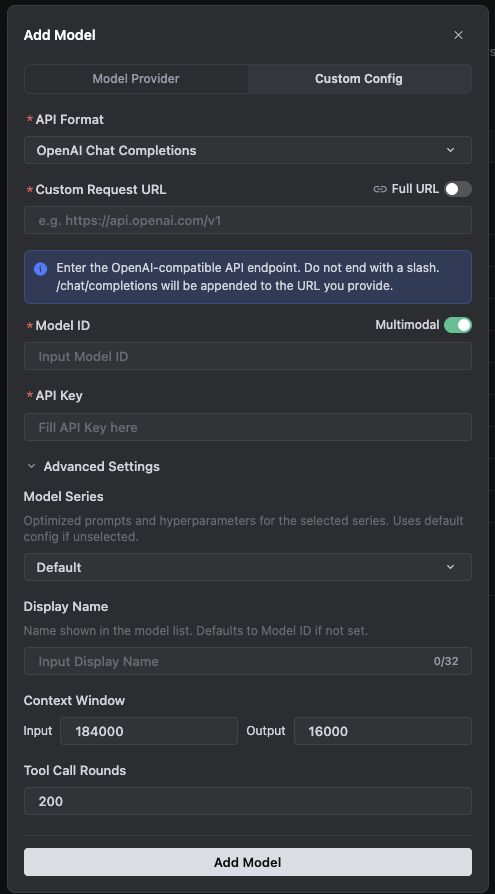
Custom model settings
Section titled “Custom model settings”In Trae, open Settings -> Models, add a custom model, and use the custom configuration path.
| Field | Value |
|---|---|
| API format | OpenAI Chat Completions |
| Custom Request URL | https://codex-pooler.example.com/v1 |
| Full URL | Off |
| Model ID | gpt-6-sol or another model id served by the assigned Pool |
| Multimodal | On when the Pool model supports image input |
| API key | Pool API key |
| Model Series | Default |
| Display Name | GPT-6 Sol via Codex Pooler |
| Context Window input | 184000 |
| Context Window output | 16000 |
| Tool Call Rounds | 200 |
If you enable Full URL instead, the value must become
https://codex-pooler.example.com/v1/chat/completions. Keep it off for the
normal setup shown above.
Trae CN labels
Section titled “Trae CN labels”In Trae CN, the same flow appears as 设置 -> 模型 and 自定义配置. The field values are the same:
| Field | Value |
|---|---|
| API 格式 | OpenAI Chat Completions |
| 自定义请求地址 | https://codex-pooler.example.com/v1 |
| 完整 URL | Off |
| 模型 ID | gpt-6-sol or another model id served by the assigned Pool |
| API 密钥 | Pool API key |
| 模型系列 | Default |
| 显示名称 | GPT-6 Sol via Codex Pooler |
| 上下文窗口 input | 184000 |
| 上下文窗口 output | 16000 |
| Tool Call Rounds | 200 |
With 完整 URL off, Trae appends /chat/completions to the request URL. If you
turn 完整 URL on, use the full
https://codex-pooler.example.com/v1/chat/completions endpoint instead.
For Trae Work, custom model availability is limited to the desktop/local environment in the current public docs. Keep this configuration on the client surface that can actually save and validate custom models.
Choose a model
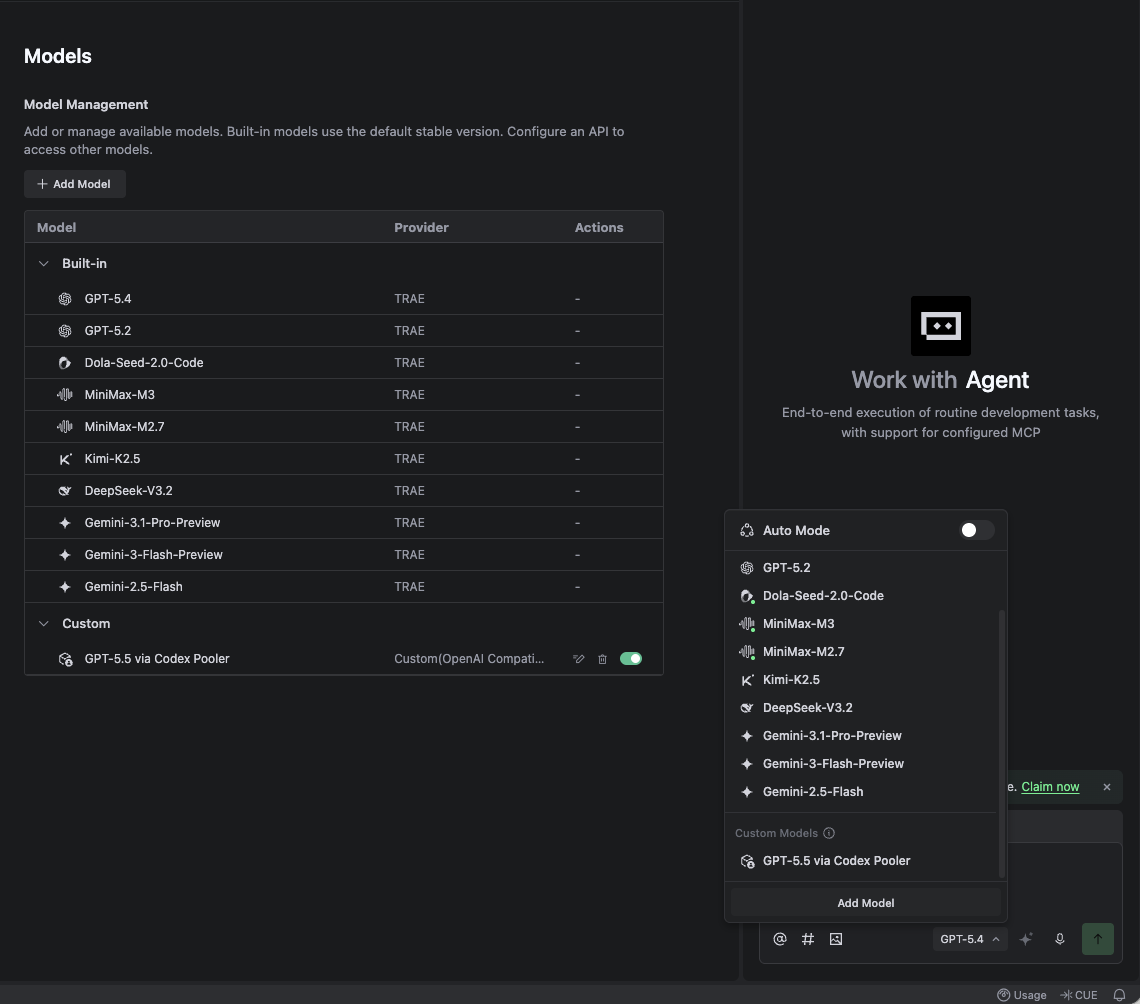
Section titled “Choose a model”After saving the custom model, open the agent model picker and turn Auto Mode off. The model list is hidden behind Auto Mode by default. Select the custom Codex Pooler model under Custom Models.
Verify the connection
Section titled “Verify the connection”First check the Pool API key and model with a direct chat-completions request:
macOS / Linux / WSL
curl -sS -X POST \ -H "Authorization: Bearer $CODEX_POOLER_API_KEY" \ -H "Content-Type: application/json" \ --data '{ "model": "gpt-6-sol", "messages": [ { "role": "user", "content": "Reply with exactly: trae ok" } ], "stream": false, "max_completion_tokens": 16 }' \ https://codex-pooler.example.com/v1/chat/completionsWindows PowerShell
$headers = @{ Authorization = "Bearer $env:CODEX_POOLER_API_KEY" }$body = @{ model = "gpt-6-sol" messages = @(@{ role = "user"; content = "Reply with exactly: trae ok" }) stream = $false max_completion_tokens = 16} | ConvertTo-Json -Depth 5Invoke-RestMethod -Method Post -Uri "https://codex-pooler.example.com/v1/chat/completions" -Headers $headers -ContentType "application/json" -Body $bodyFor local setup, change the URL to
http://localhost:4000/v1/chat/completions.
Then save the custom model in Trae or Trae CN. Treat the setup as working only
when the model add/check step succeeds and a real chat can answer trae ok
through the configured model.
In Codex Pooler’s request logs, match the request time, API key, model, and final status to your test. A reply alone does not confirm that the client used your Pooler instance.
Compatibility notes
Section titled “Compatibility notes”Trae should point at Codex Pooler’s /v1 base URL with Full URL off, or at
/v1/chat/completions only when Full URL is on. Do not point Trae at
/backend-api/codex, /v1/responses, /mcp, or a Codex Pooler admin URL.
Codex Pooler model use does not require MCP. If you need operator metadata, use a separate MCP-capable host with an operator MCP token.